Hi @Saif
Thank you for your detailed answer.
I am now adding the API key as seen below using the payload args.iparams.apiKey.
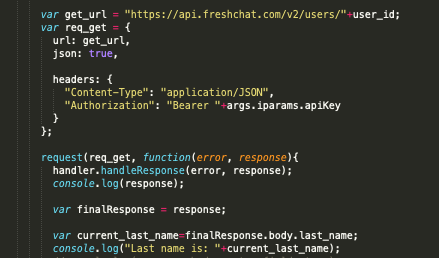
In this case, if I add the API key directly in iparams.json like the following, I am getting an error in the terminal.
{ "apiKey":"Value" }
Error:
The local server could not be started due to the following issue(s):
[ERROR] Exception occured while validation: Cannot use 'in' operator to search for 'options' in eyJhbGciOiJSUzI1NiIsInR5cCI.........."
I also tried pasting the Bearer Token in the custom installation local link though I don’t have custom installation parameters(only API token) and the error I receive is the previous “Post config…” along with the “JWT strings must contain exactly 2 period characters. Found: 0”
Can you let me know what is the right way to test if the API token is accessible from iparams.json?
Answers to your questions:
- May I know how you learnt to use
iparam_test_data.json? This is deprecated and no longer expected to be used.
- The iparam_test_data.json file was available under the config folder when I created the app so I figured maybe it could be used but I understand now that it can’t.
- Could let me know where are you seeing the error as present in screenshot? Is it on Freshworks CLI (called FDK) ?
- I logged the response of the API call and that is where the error was displayed in the body in my terminal.