Dear Developers,
We are committed to this mission and advancing towards becoming the best developer-friendly organisation in the SaaS ecosystem, and we are moving towards it steadily, one step at a time.
Today, we are excited to announce the introduction of role-based access control for developer accounts. A major step towards enabling granular access control and flexibility in how teams collaborate on apps.
What’s new?
We now support three user roles for the developer portal.
- Account Owner
- Full access, including user management, inviting users, changing roles, enabling/disabling users, and managing all apps
- Admin
- Full control over apps, configurations, and team management
- Can assign roles and manage access
- Developer
- Can build, test, and manage apps
- Can generate API tokens and other necessary configs used for app management with AI Developer Tools.
- No access to sensitive administrative controls
You can now assign only admin and developer roles within your developer account. The account owner is auto-assigned to the user who created the developer account.
Why this change and the problem we heard
Until now, access to the Developer Portal has been limited to Administrators and Account Administrators. This created a few challenges:
- Over-permissioning risk
Developers often had to be granted full admin access just to build or manage apps, resulting in increased security exposure. - Inefficient collaboration workflows
Many customers rely on external developers, partners, or internal teams to build apps. Without scoped access, collaboration wasn’t seamless. - Operational bottlenecks
In several cases, TAMs/CSMs had to act as intermediaries, thereby receiving app ZIPs and uploading them manually. This led to back-and-forth and a higher turnaround time for rolling out app changes.
With the introduction of our AI Developer Tools and deeper integration across the developer ecosystem, which enables developers with direct app management from within their workspaces, this approach was no longer sustainable.
What it means for you
- No need to grant full admin access to developers
- Faster development cycles, as developers can directly build and deploy apps
- Seamless collaboration with partners, vendors, and internal teams
- Improved security posture with controlled permissions
 Key highlights
- RBAC is enabled at the developer account level, keeping it disjoint from product accounts and related roles. This means if the product trials expire or the product subscription is suspended, developers can still manage their public apps via the developer portal.
- Admins can manage the complete user lifecycle
- Developers get just enough access to do their job effectively
- Existing apps and workflows remain unaffected
FAQ
Who can log in to the developer account in the developer portal for the first time?
Only an organization admin can log in to the developer account in AMP for the first time. If a non-admin user attempts to log into AMP for the first time, they will see an error message stating “You don’t have an account.” The organization admin must first set up the developer account before other team members can access the portal. The first organization admin who logs into AMP will become the account owner.
What types of developers can sign up for the developer portal?
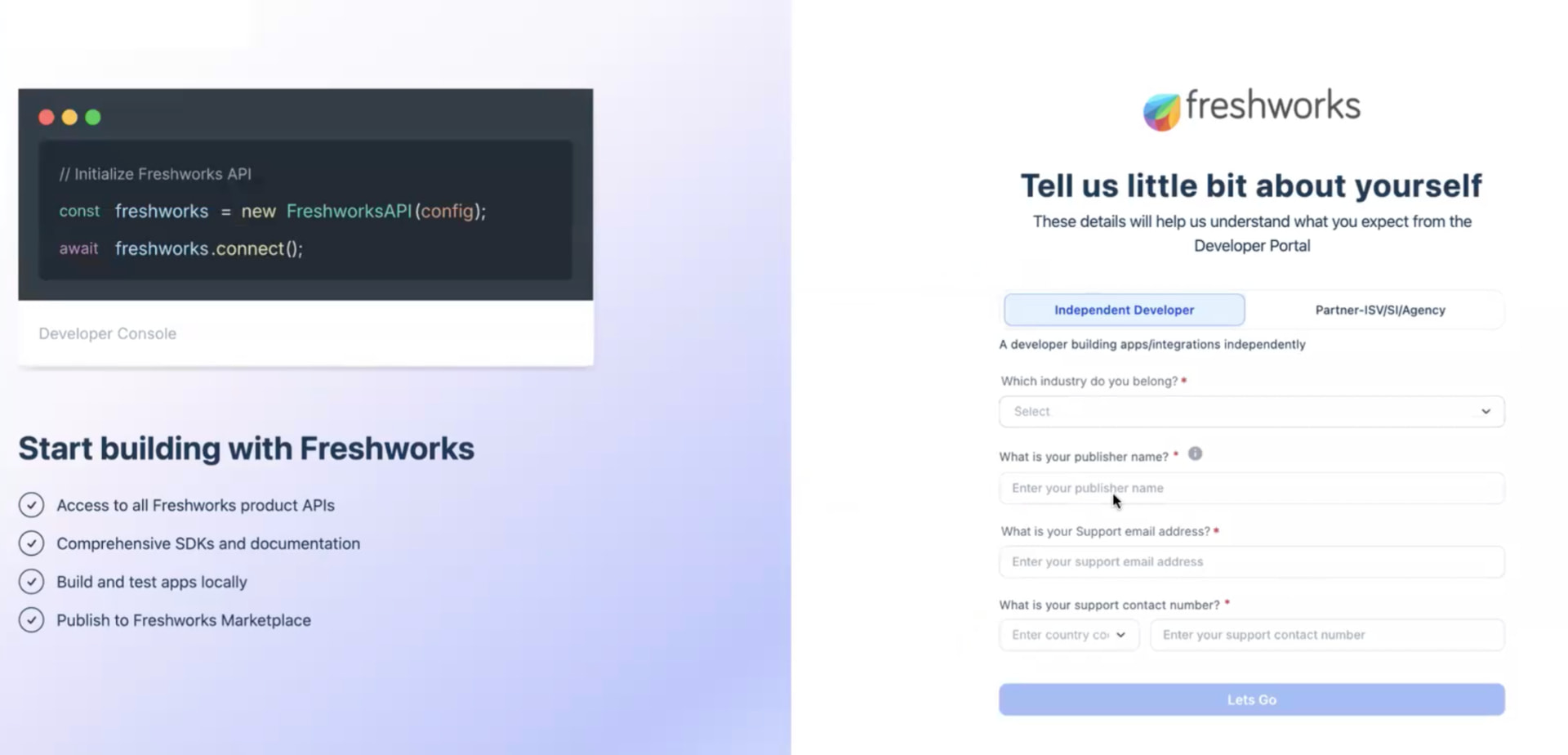
AMP supports three developer types, each with a tailored onboarding experience:
- Individual Developer: Independent developers building apps for the marketplace
- SI Partner: Partner organizations building integration solutions
- Customer Developer: Freshworks customers building custom apps for their own use
Will this change who can access the Developer Portal?
Yes, now the non-admin users (Developers) can access the portal with scoped permissions managed by developer account admins.
Do I still need to share admin access with external developers?
No, you can assign them the Developer role, instead, which can be used just for app management and development purposes alone.
Will this reduce dependency on TAMs/CSMs for app uploads?
Yes, if given relevant access, developers can now directly manage app lifecycles, reducing back-and-forth with app zip share with reduced security exposure.
Can Admins control and update these users anytime?
Absolutely, roles are flexible, admins can invite the users, enable or disable them, and can even delete them as needed, giving them full control over user lifecycle management.
What happens to my existing public apps after the transition to developer accounts?
Your existing public apps will continue to be displayed in AMP without any disruption. Moving forward, any new public apps you create will be linked to your developer account instead of a product account. However, custom apps will remain linked to the product account as before.
How can I add additional users to my AMP developer account?
If a user already exists in your organization and their account has been activated, they can be directly added to AMP and will have immediate access to the portal. Account Owners and Admins can invite new users by clicking “New User” in the User Management page, entering their email, selecting a role (Admin or Developer), and sending an invitation.
What about the new users?
The Go to Developer Portal navigation from the app gallery for the new users with product admin roles alone, such as Administrator, Account Admin, etc will land on the No Access page, unless they are added to the developer account by the account admins.
Why am I seeing a “You don’t have an account” error?
Contact your organization admin or Account Owner to resolve this issue. This error appears when:
- You’re a non-admin user trying to access AMP for the first time before the organization admin has created the developer account
- You’re an existing organization user who hasn’t been invited to the developer account yet
- Can I change a user’s role after they’ve been added to AMP?
Yes. Both Account Owners and Admins can update user roles between Developer and Admin at any time. The role change takes effect once the current session expires. You can switch a Developer to an Admin role or vice versa through the User Management page.
Can disabled or deleted users access AMP?
No. Disabled or deleted users cannot access AMP. If you try to log in with a disabled or deleted user login, you will see a “No Access” or “You don’t have an account” error message. Disabled users can be re-enabled by an Account Owner or Admin, but deleted users must be re-invited to regain access.
Next steps
- For the existing organisations, the Organisation admin now is required to sign up for the developer account by clicking on 'Go to developer portal’ if not done already
- We have improved the onboarding journey for the developers, as shown below. The developer organisation supports account metadata about your organisation. Do update your account details, as applicable.
We’re eager to hear your feedback!
This is a big step toward making the platform more secure, efficient, and developer-friendly. Let us know what you think and what roles/permissions you’d like to see next.
Regards,
Team Freshworks Developers