I am currently working on a widget based of the 3.0 platform. The widget is mainly being rendered as a ticket_sidebar app in Freshdesk and recently I have added a button to show the widget in a larger view using the showModal-method.
The problem I am facing is that no matter how small I make the app, the modal shows a scrollbar, and if the app gets tall enough it adds its own scrollbar which results in double scrollbars.
As a test I tried rendering the smallest possible html-file I could think of in the modal, and the scrollbar is STILL there. This makes me think it might be a bug with the platform or possibly with Chrome?
This is the code I use to trigger the modal:
function handleOpenInModal () {
    try {
      client.interface.trigger('showModal', {
        title: 'Nestor XL',
        template: './modal-test.html',
        noBackdrop: true,
        data: {
          preloadedData: {
            order: selectedOrder,
            orders: orders,
          },
        },
      });
    } catch (error) {
      console.error('Error triggering modal:', error);
    }
  };
The data attached is normally used in the rendered modal, but not used for this particular test.
And this is the entirety of modal-test.html:
<!DOCTYPE html>
<html lang="en">
	<head>
		<meta charset="UTF-8" />
		<title>Modal test</title>
	</head>
	<body>
		<div>Hello world!</div>
	</body>
</html>
This is the result:
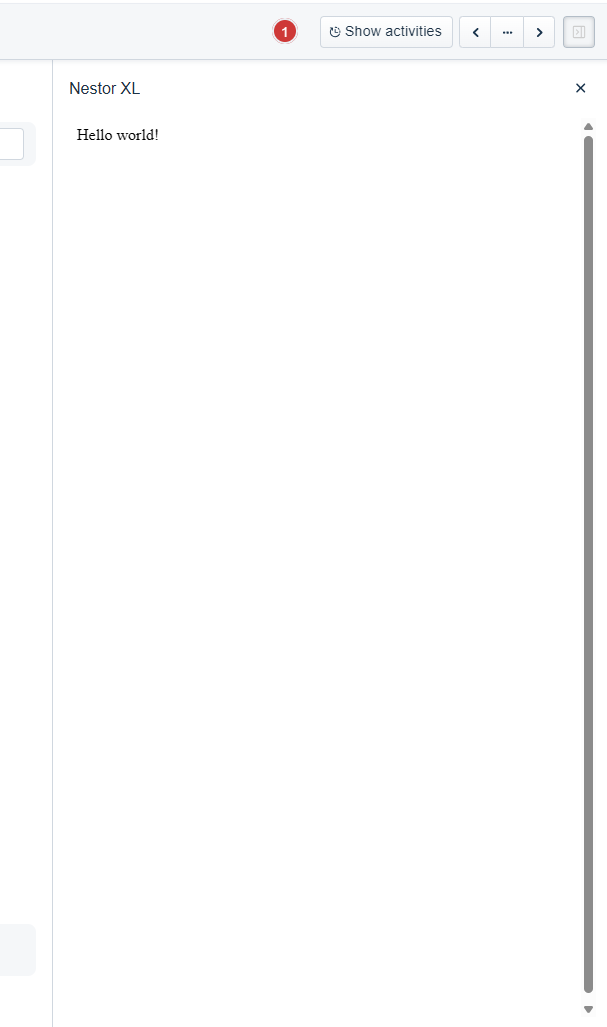
As you can see, the scrollbar is quite annoying…
Looking in dev-tools the scrollbar seems to be applied to the <div> that is the parent of the iframe that holds the app:

So it is in other words not rendered by the custom app itself.
Does anyone know if I can get rid of the scrollbar? If this is a platform bug, a fix would be greatly appreciated 
